ezyLiv - The Best Surveillance App to Monitor & Live View
In today's fast-paced digital world, staying connected to your devices and managing video streams efficiently is essential. The ezyLiv mobile app offers a seamless and intuitive platform for Android and iOS users to control and monitor their video streams effortlessly. Whether you're managing home security, monitoring office premises, or overseeing any other critical surveillance system, ezyLiv provides unmatched convenience and advanced features tailored to your needs.
Why Choose ezyLiv?The ezyLiv app stands out for its exceptional functionality and user-friendly interface, ensuring anyone can navigate and use it efficiently. Let's delve into the major features that make ezyLiv a must-have application for video stream control:
Key Features of ezyLiv App
1. User-Friendly GUI
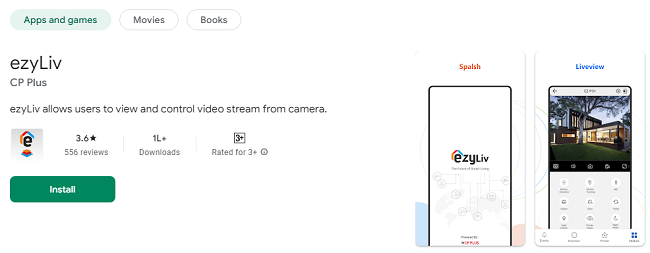
The ezyLiv app boasts an intuitive graphical user interface (GUI) designed for simplicity and efficiency. Whether you are a tech-savvy individual or new to video stream management, the app ensures a smooth experience. Clear navigation, responsive controls, and a visually appealing design make managing your devices a breeze.
2. QR Code Scanning for Easy Device Addition
Adding devices to the app is incredibly simple with the integrated QR code scanning feature. Instead of manually entering device details, users can quickly scan a QR code to add their devices to the app. This feature saves time, reduces errors, and makes the setup process effortless.
3. Flexible Live Preview
Enjoy a dynamic and flexible live preview experience with ezyLiv. Whether you want a single-camera view or a multi-camera setup, the app allows you to customize your live preview preferences. Monitor multiple streams simultaneously and stay updated on every angle of your surveillance area.
4. Push Notifications for Instant Alerts
Stay informed about critical updates with real-time push notifications. The ezyLiv app ensures you never miss important alerts, whether it's a motion detection event, device status update, or any other essential notification. This feature keeps you connected and aware, even when you're on the go.
5. PTZ Control for Enhanced Viewing
Pan-Tilt-Zoom (PTZ) control allows users to remotely adjust their camera’s view. With ezyLiv, you can effortlessly pan, tilt, or zoom in on specific areas, providing greater control and a comprehensive view of your surroundings. This feature is perfect for monitoring large areas or focusing on specific points of interest.
6. Remote Configuration of Devices
Gone are the days of physically accessing your devices for configuration. The ezyLiv app enables remote configuration, allowing you to adjust settings, update firmware, and manage preferences directly from your smartphone. This feature saves time and ensures your devices are always optimized.
7. Two-Way Talk for Seamless Communication
The two-way talk feature transforms your devices into a communication tool. Whether you need to address a visitor at your door or communicate with someone on-site, ezyLiv’s two-way talk functionality ensures clear and real-time audio communication.
8. Basic Health Monitoring
Keeping track of your device’s health is crucial for uninterrupted operation. ezyLiv provides basic health monitoring features, enabling users to check whether their devices are online or offline. This feature ensures you’re always aware of your system’s status.
Benefits of Using ezyLiv App
1. Enhanced Security and Peace of Mind
With its advanced features like real-time alerts, flexible live preview, and PTZ control, ezyLiv enhances your security system's capabilities. Whether you’re at home or away, the app ensures you remain in control of your surveillance devices.
2. Convenience at Your Fingertips
From remote configuration to QR code scanning, ezyLiv simplifies device management. The app’s user-friendly design ensures you can perform complex tasks with just a few taps on your screen.
3. Cost-Effective Solution
By enabling remote management and real-time updates, ezyLiv reduces the need for additional hardware or frequent professional assistance. This makes it a cost-effective solution for managing video streams.
4. Versatile Application
Whether you're a homeowner, business owner, or security professional, ezyLiv caters to various needs. Its diverse features make it suitable for personal and professional use.
How to Download and Use ezyLiv App?
Step 1: Download the App
The ezyLiv app is available for free on both the Google Play Store and Apple App Store. Simply search for "ezyLiv" in your app store, and download the app to your smartphone or tablet.
Step 2: Install and Set Up
After downloading, open the app and follow the on-screen instructions to set up your account. Use the QR code scanning feature to quickly add your devices to the app.
Step 3: Explore the Features
Once your devices are added, explore the app’s features like live preview, PTZ control, and two-way talk. Customize the settings to suit your preferences and enjoy seamless device management.
Tips for Maximizing Your ezyLiv Experience
1. Enable Notifications
Ensure push notifications are enabled to receive real-time alerts and updates about your devices. This helps you stay informed about important events and potential security threats.
2. Regularly Update the App
Keep your app updated to access the latest features and improvements. Regular updates enhance the app’s performance and security.
3. Utilize PTZ Control Effectively
Use the PTZ control feature to monitor larger areas or focus on specific points of interest. This feature is particularly useful for businesses or properties with expansive surveillance needs.
4. Perform Health Checks
Regularly check your device’s health status through the app to ensure all devices are online and functioning properly. Address any issues promptly to maintain uninterrupted monitoring.
FAQs about ezyLiv App
1. Is ezyLiv compatible with all devices?
ezyLiv is designed to work with a wide range of devices. Ensure your device is compatible by checking the app’s specifications in the app store.
2. Can I use ezyLiv on multiple devices?
Yes, ezyLiv supports use on multiple smartphones and tablets, allowing you to access your video streams from various devices.
3. Is my data secure on ezyLiv?
Absolutely! ezyLiv prioritizes user data security and implements robust encryption methods to protect your information.
4. Does the app support multiple languages?
Yes, ezyLiv offers multi-language support to cater to users from diverse regions.
5. Can I customize notification settings?
Yes, the app allows users to customize notification preferences based on their requirements.
Final ThoughtsThe ezyLiv app is a powerful and versatile tool for managing video streams and enhancing security. With its user-friendly interface, advanced features, and seamless functionality, ezyLiv ensures you stay connected and in control, no matter where you are. Download the ezyLiv app today and take the first step towards smarter, more efficient device management.
Trending Now
Updates